'%20fill='url(%23cc-green)'%20stroke='url(%23cc-green)'%3e%3cpath%20d='M60%20102h44l70%20112'%20fill='none'%20stroke-width='38'%20stroke-linecap='round'%20stroke-linejoin='round'/%3e%3crect%20x='142'%20y='128'%20width='328'%20height='212'%20rx='76'%20stroke='none'/%3e%3cpath%20d='M388%20300l62-24%202%2072z'%20stroke-width='20'%20stroke-linejoin='round'/%3e%3ccircle%20cx='222'%20cy='410'%20r='32'%20stroke='none'/%3e%3ccircle%20cx='372'%20cy='410'%20r='32'%20stroke='none'/%3e%3c/g%3e%3c/svg%3e) ChatCart
ChatCart
Reference
WhatsApp template
At checkout, ChatCart turns the store's message template into one text message and opens it in
WhatsApp with a wa.me link. Change the template in
Settings, WhatsApp message. Click a token chip to insert it, and check the live
preview.
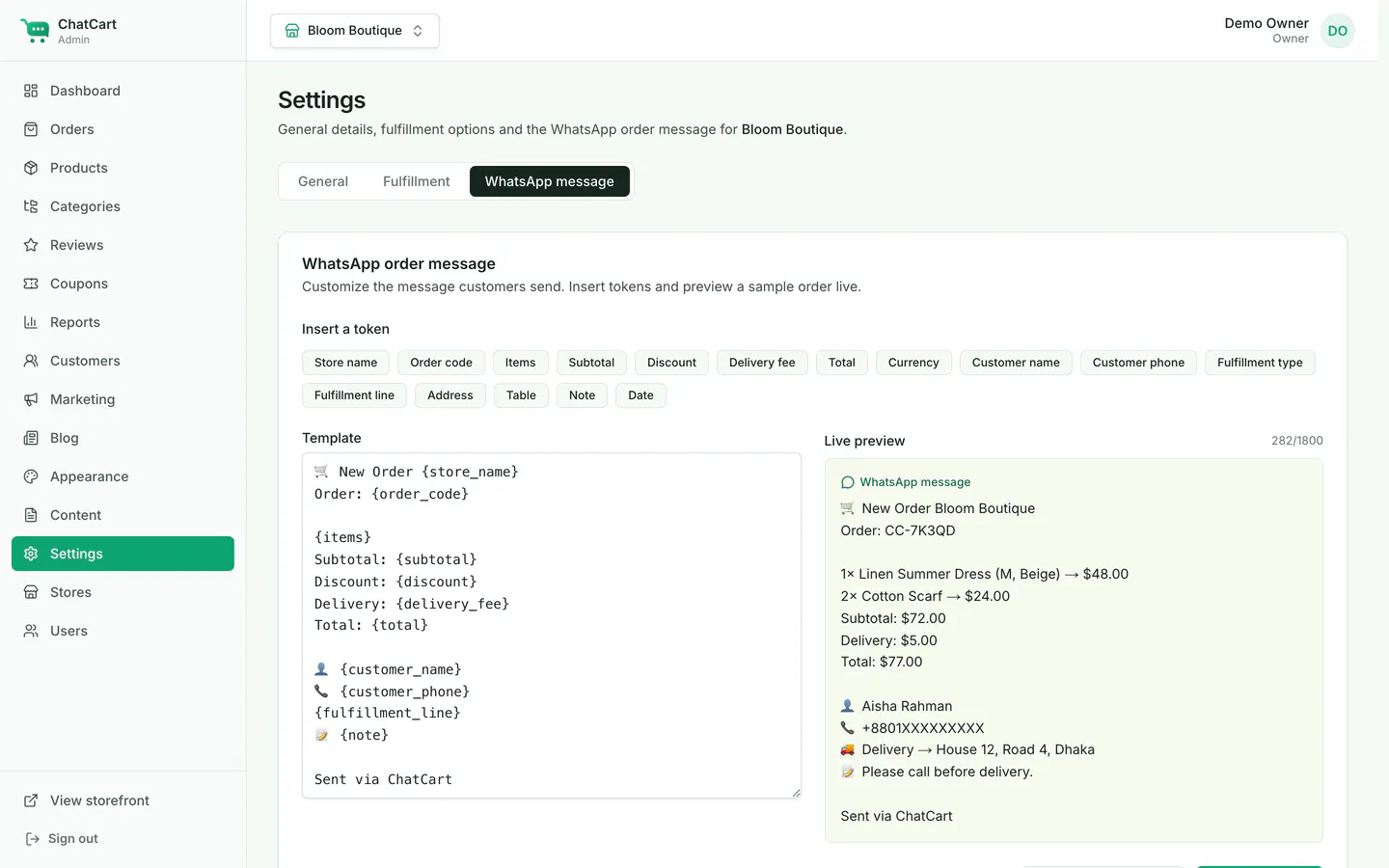
Tokens
Put any of these tokens, with the curly brackets, in your template. A token ChatCart does not know stays as it is, so a typo is easy to see.
| Token | Shows |
|---|---|
{store_name} |
The store name. |
{order_code} |
The order code, for example CC-7K3PQ9. |
{items} |
One line per item, such as 2× Cotton Scarf → $24.00, with the variant in
brackets.
|
{subtotal} |
The cart subtotal, in the store currency. |
{discount} |
The coupon discount. The line is removed when no coupon was used. |
{delivery_fee} |
The delivery fee, or Free when it is zero. |
{total} |
The order total. |
{currency} |
The store currency code. |
{customer_name} |
The customer name. |
{customer_phone} |
The customer phone. The line is removed when it is empty. |
{fulfillment} |
The raw type: delivery, pickup or dinein. |
{fulfillment_line} |
A friendly line: 🚚 Delivery → {address}, 🏬 Pickup, or
🍽 Dine-in → Table {table}.
|
{address} |
The delivery address. |
{table} |
The dine-in table number. |
{note} |
The customer note. The line is removed when it is empty. |
{date} |
The order date and time (ISO format). |
Default template
🛒 New Order {store_name}
Order: {order_code}

{items}
Subtotal: {subtotal}
Discount: {discount}
Delivery: {delivery_fee}
Total: {total}

👤 {customer_name}
📞 {customer_phone}
{fulfillment_line}
📝 {note}

Sent via ChatCart
Good to know
-
Empty lines are removed. A line whose only content is an empty
{customer_phone},{note}or{discount}is dropped, so you never get a lonely 📞 or 📝. -
Free delivery.
{delivery_fee}shows Free instead of a zero amount, for example for pickup, dine-in, or orders above the free-delivery threshold. -
Length limit. A message is cut at 1,800 characters so the
wa.melink still opens. If a very long note goes over the limit, the note is shortened first. -
Currency and language. Money uses the store currency and the customer's
language. The fixed words inside the template (
Free,Delivery,Pickup,Dine-in) are English. Translate them by editing the template.
Opening WhatsApp again
The order confirmation page shows the order code, a summary, an Open WhatsApp button that opens the same message again, and a Copy message button for when pop-ups are blocked.
The page address has a private key at the end (?k=...), so only the customer who
placed the order can open it. A signed-in customer can also open it from
My orders. Staff see every order in Admin > Orders.