'%20fill='url(%23cc-green)'%20stroke='url(%23cc-green)'%3e%3cpath%20d='M60%20102h44l70%20112'%20fill='none'%20stroke-width='38'%20stroke-linecap='round'%20stroke-linejoin='round'/%3e%3crect%20x='142'%20y='128'%20width='328'%20height='212'%20rx='76'%20stroke='none'/%3e%3cpath%20d='M388%20300l62-24%202%2072z'%20stroke-width='20'%20stroke-linejoin='round'/%3e%3ccircle%20cx='222'%20cy='410'%20r='32'%20stroke='none'/%3e%3ccircle%20cx='372'%20cy='410'%20r='32'%20stroke='none'/%3e%3c/g%3e%3c/svg%3e) ChatCart
ChatCart
Use ChatCart
Home page builder
The home page is a list of sections. You choose which sections appear, in which order, with which heading. Open Appearance and scroll to Home layout.
When Home layout has at least one section, it controls the home page, and the
simple Homepage sections switches above it are not used. Remove every section
from Home layout to go back to the simple switches.
The parts of the builder
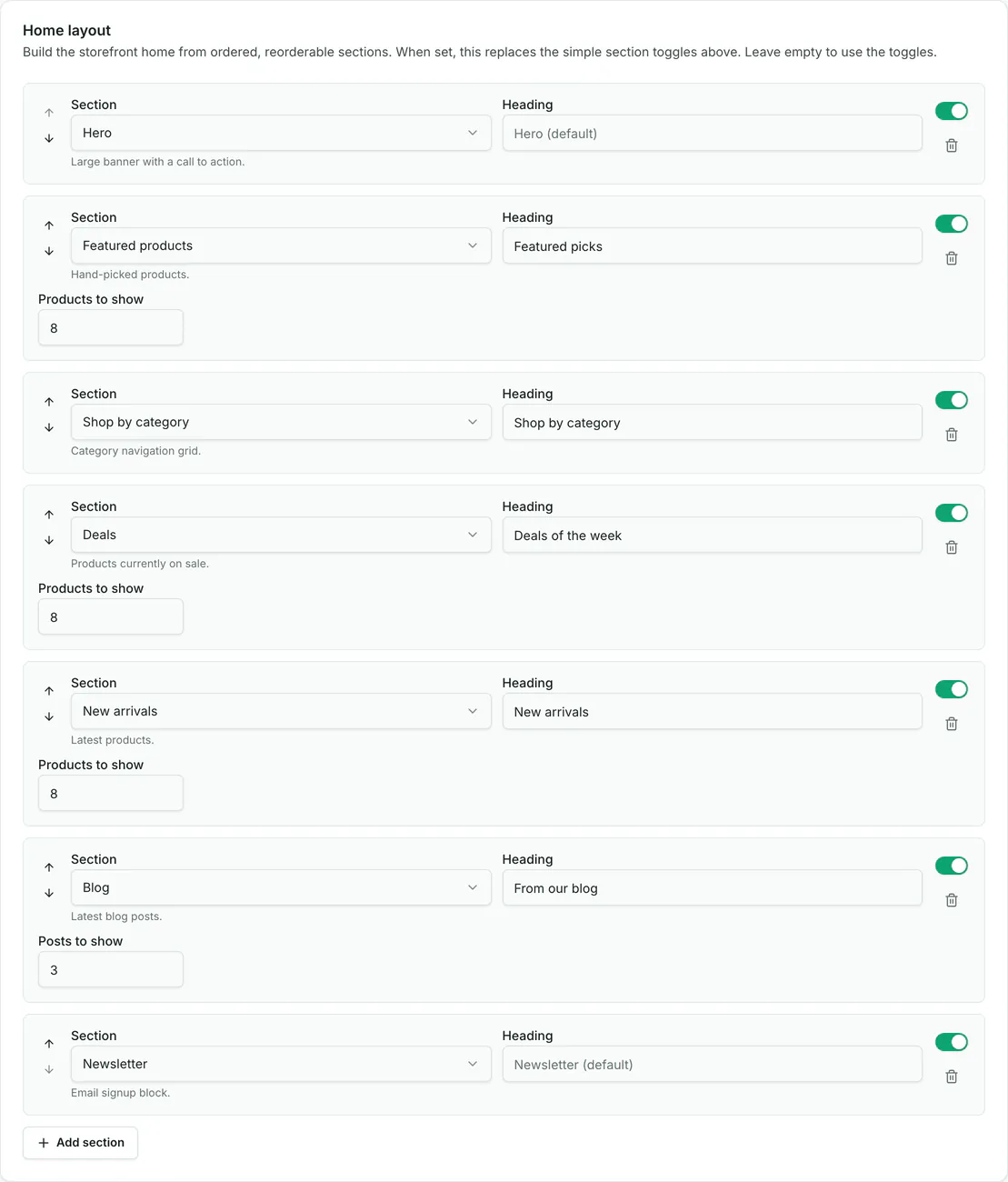
- Move up and down: changes the order. The top section is shown first on the home page.
- Section: the type of block. Hero, Featured products, Shop by category, Banner grid, Banner slider, New arrivals, Deals, Testimonials, Newsletter, Rich text, or Blog.
- Heading: the title above the section. Leave it empty to use the default title.
- On and off switch: hides the section without deleting it. Good for a sale that comes back.
- Remove: deletes the section from the list.
- Extra settings: product sections have Products to show (1 to 24). Blog has Posts to show (1 to 12). Rich text has a Content box for your own text.
- Add section: adds a new section at the end of the list.
Click Save at the bottom of the page, then reload the storefront.
Where each section appears
The list in the admin is the home page from top to bottom. Here is the demo store: each row on the left becomes the band with the same number on the right.
Tips
- Hero shows your first banner, and Banner grid shows the other banners. Add banners first.
- Featured products shows the products with Featured turned on. Deals shows products with a sale price. New arrivals shows the newest products.
- Blog and Newsletter only show when the blog and the newsletter are turned on for the store.
- You can use the same section type twice, for example two Rich text blocks.